
F1TENTH
In this semester, we developed and validated our approach using two platforms: the F1TENTH prototype platform and the ACM simulation environment. The F1TENTH platform was used as an initial prototype to validate the core navigation pipeline and system data flow. The pipeline consists of several main components: mapping, localization, path planning, control, and user interface.
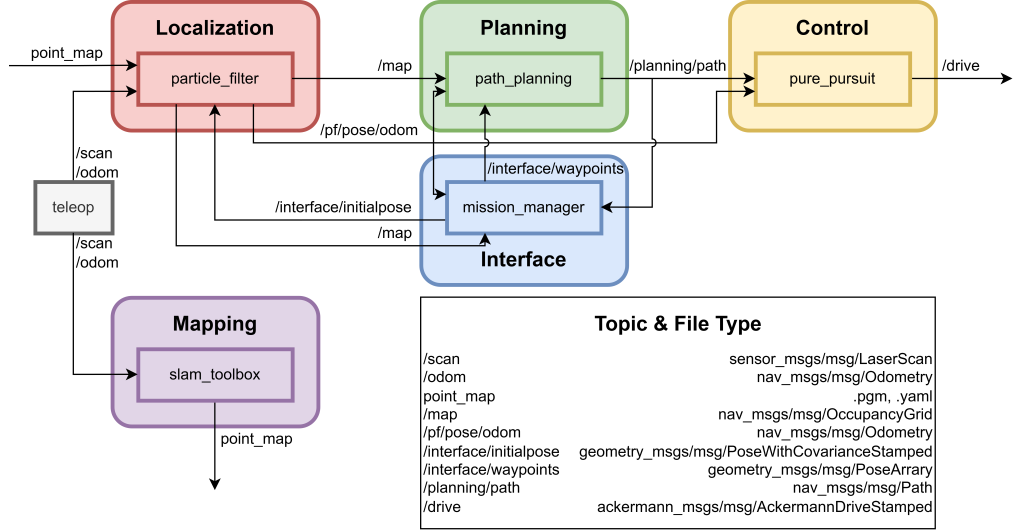
Verification Criteria
- ROS2 Node: All ROS2 Node launch without error.
- Mapping: Ensure Teleop module publishes correct topics (/scan, /odom) and Mapping module subscribes them.
- Mapping: The constructed map is filtered and adjusted by map processing tool to remove dynamic obstacles and unreliable points.
- Localization: Generate localization pose (/pf/pose/odom).
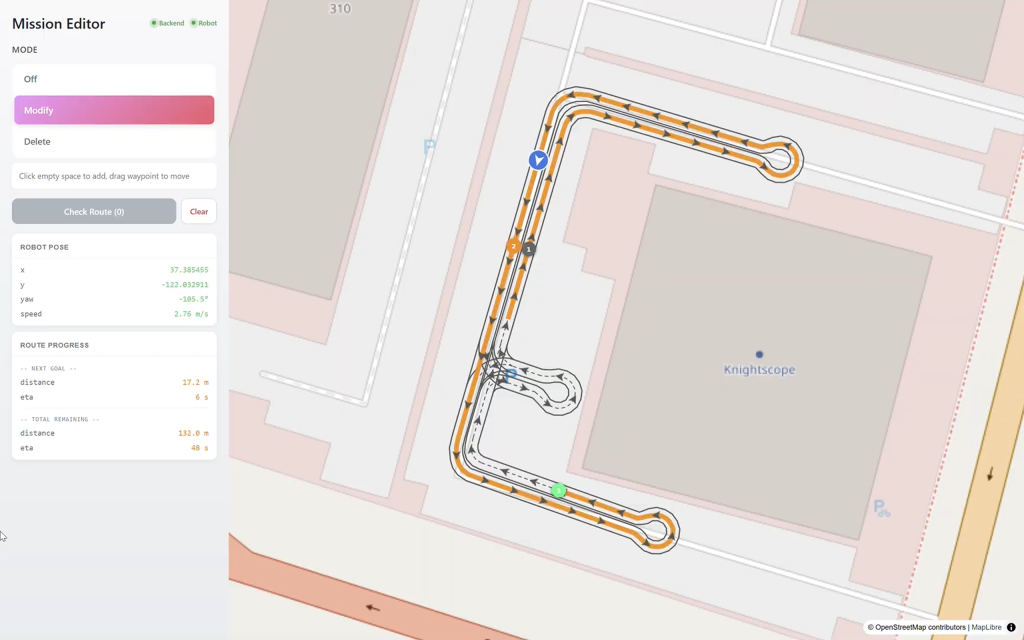
- UI/UX: The subscribed robot pose and map data should be correctly displayed on the interface, with the rendered robot position accurately aligned with its simulated physical position. Additionally, after the waypoint topic is published, the system stack should detect the message properly.
- UI Sync: Remote UI updates robot pose without freezing/crashing the onboard ROS bridge
- PPA: Successfully plan a smooth path and generate desired output for the pure pursuit control module.
- Pure Pursuit: Manage to read \path from PPA and \odom from localization module and generate \steering output that’s readable by control module.
- Control Safety: No ”jerk” movements when traverse all the waypoints.
- Path Accuracy: Physical cross-track error less than 15cm compared to planned path.
Mission Manager (Frontend + Backend)
The original system used roslib.js, where the frontend communicated directly with ROS via a WebSocket bridge. While suitable for rapid prototyping, this approach tightly coupled the frontend with ROS, leading to scalability and stability issues under multiple concurrent connections. As figure shown below, we redesigned the system by introducing a FastAPI-based backend as an intermediate layer. This backend manages communication, reduces load on ROS, and improves robustness, while also enabling better concurrency, fault isolation, and future extensibility (e.g., integration with AI or database services).
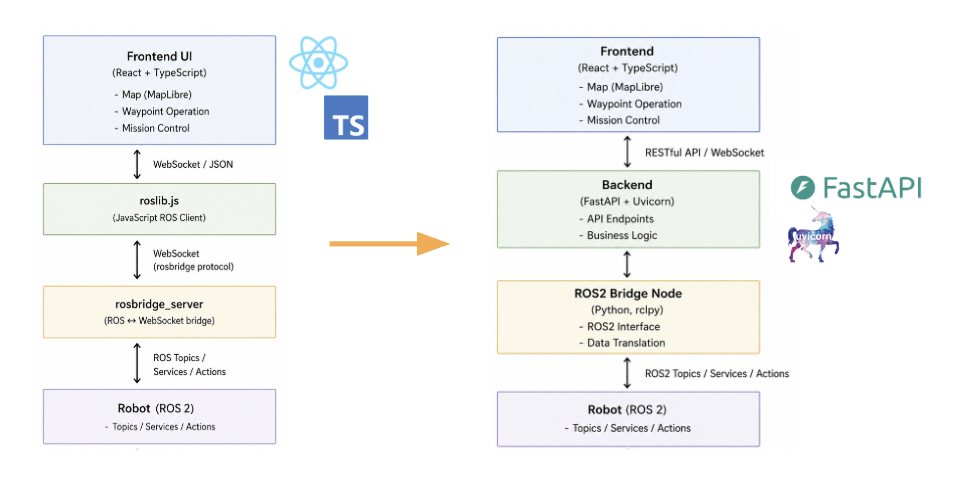
The repository is our mission manager that include both frontend and backend. We run both servers in a Dockerized environment and manage them using Docker Compose. You can follow the provided instructions to launch the system. Note that the mission manager needs to connect to the robot and associated devices, so proper network configuration and access permissions are required to ensure successful communication.
Goal Scheduler
Develop the Goal Scheduler for the F1Tenth to LSV migration to support sequential waypoint execution, heading assignment integration, goal approaching checks, patrol loop behavior, autonomous mode triggering, and re-scheduling when needed.
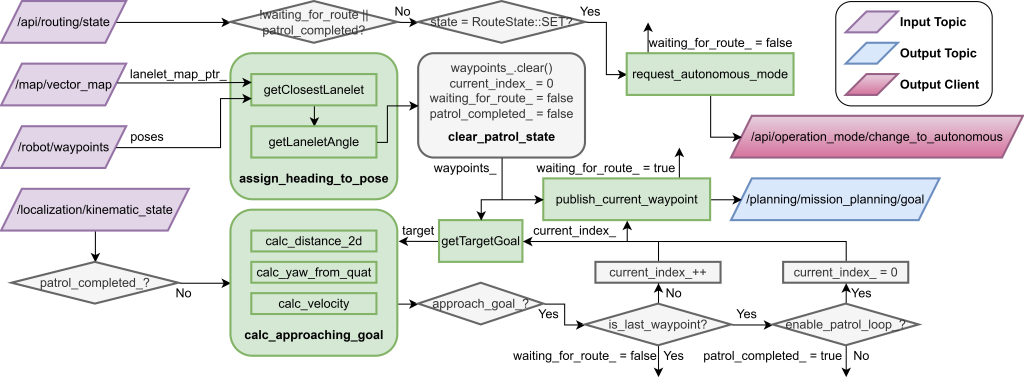
The system will:
- Receive the waypoint sequence with order from the user interface.
- Publish the waypoint to connect with the ACM mission planner.
- Automatically conduct patrol behavior on the ACM system.
Acceptance Criteria
- The Goal Scheduler can accept and publish goals in the expected I/O format, and the overall dataflow is clearly defined and implemented.
- Waypoint heading assignment is integrated, and each published goal contains the correct heading information from closest lanelet map.
- The system can detect when the vehicle reached a goal using defined distance, yaw angle, and velocity thresholds.
- The scheduler supports patrol loop behavior, allowing the vehicle to continue through a waypoint sequence and loop when configured.
- The scheduler can trigger autonomous mode at the correct point in the execution flow and avoid redundant or premature requests.
- A re-schedule mechanism is implemented to handle state updates without breaking the system.
- The full Goal Scheduler flow is tested and validated across normal and edge-case scenarios.
- Documentation is provided, including architecture, key logic, interfaces, and expected behavior.
Skeleton Detection and Person Tracking
Introduction
The skeleton_detection package is a core component of the PatrolKnight autonomous security stack. It utilizes an OpenPifPaf-based neural network to perform real-time skeleton detection and person tracking on an image stream. The software is designed to integrate seamlessly with the robot’s primary sensor suite and outputs:
- Raw per-frame skeleton metadata on
/skeleton_detection/frame - Annotated image frames (with drawn skeletons, bounding boxes, and tracking IDs) on
/skeleton_output - An annotated MP4 and JSON metadata log saved directly to disk.
This package supports two primary workflows: processing a local static MP4 video file or subscribing to a live RealSense color camera topic.
Software Access and Documentation
The software package is documented through two README files:
OpenPifPaf Environment Setup README
https://github.com/patrol-knight/skeleton_detection/blob/main/README2.md
This guide explains how to install and configure the required OpenPifPaf environment, including the pre-trained skeleton detection model and its external dependencies.
Skeleton Detection Package README
https://github.com/patrol-knight/skeleton_detection/blob/main/README.md
This guide explains how to use the ROS 2 skeleton_detection package, including package overview, output topics, build instructions, launch commands, visualization steps, artifact export, and troubleshooting notes.
Usage Overview
To use the package, first follow the OpenPifPaf setup instructions to prepare the model environment. Then build the ROS 2 package with colcon, source the workspace, and launch the detector in either offline mode or live camera mode.
Offline mode processes a local MP4 input stream and is useful for repeatable testing and debugging. Live mode subscribes to the RealSense D435i color image topic and is used for real-time skeleton detection during patrol operation.
Anomaly Detection
Introduction
The anomaly_detection package is a core component of the PatrolKnight autonomous security stack. It implements a two-stage pipeline to detect and classify anomalous human behaviors in real time using skeleton data published by the upstream skeleton detection module. The system is designed to operate fully onboard the robot without transmitting any data to external services, satisfying the privacy requirements of the deployment environment. It outputs:
- Structured detection results on
/anomaly_detections, includingtimestamp,person_id,anomaly_score,is_anomalyflag,detected_anomaly_actions, and a natural language explanation - A non-blocking popup window displaying the frozen anomaly frame with the anomalous person’s skeleton,
frame_id,person_id, and an “ANOMALY DETECTED” overlay upon first detection
This package supports two primary workflows: offline processing against pre-recorded skeleton JSON logs for development and benchmarking, and live inference by subscribing directly to the /skeleton_detection/frame topic during robot operation.
Anomaly Detection README: This is the link to the usage of anomaly detection part of the system.
Overview
Stage 1 uses the Graph-Jigsaw Conditioned Diffusion Model (GJCD), trained on normal skeleton sequences from the ShanghaiTech Campus dataset, to produce a continuous anomaly score in the range [0, 1] based on reconstruction error — no anomaly-labeled training data is required. When the Stage 1 score exceeds a configurable threshold, Stage 2 is triggered: per-person skeleton windows are converted into structured natural language motion descriptions and passed to a locally hosted facebook/bart-large-mnli model for zero-shot action classification across categories including fighting, chasing, falling, pushing, throwing, jumping, loitering, hiding, trespassing, and playing with a ball. The final output is a weighted fusion of both stages, balancing detection reliability with classification interpretability.